Iceland - Minor (23.2)
Release Summary
Kaptio is proud to announce this minor release for Iceland. This release is intended to address issues with previous releases.
See Minor Changes and Bug Fixes for more information.
Minor Changes
Feature: Booking Overview
Show routes in Booking Overview (ST-3032)
When a route is associated with the itinerary item’s price category, service lines appear as:
<Route Name> - <External Name>
Example: highclere castle - historic twin cabin
If no route is available, the display remains unchanged.
Feature: Room Allocation
Reduce Occupancy within a room Without Affecting Price (ST-2876)
State Before
Removing passengers from the itinerary affects the original price.
State After
Removing passengers from the itinerary does not affect the original price.
How to enable?
Assign Show Room Allocation Button permission set to the users who should have access.
How it works?
A new button is visible on the itinerary record view once the 'Show Room Allocation Button' permission set has been assigned.
After clicking on it you are greeted with a modal that enables you to remove passengers without affecting the original price.
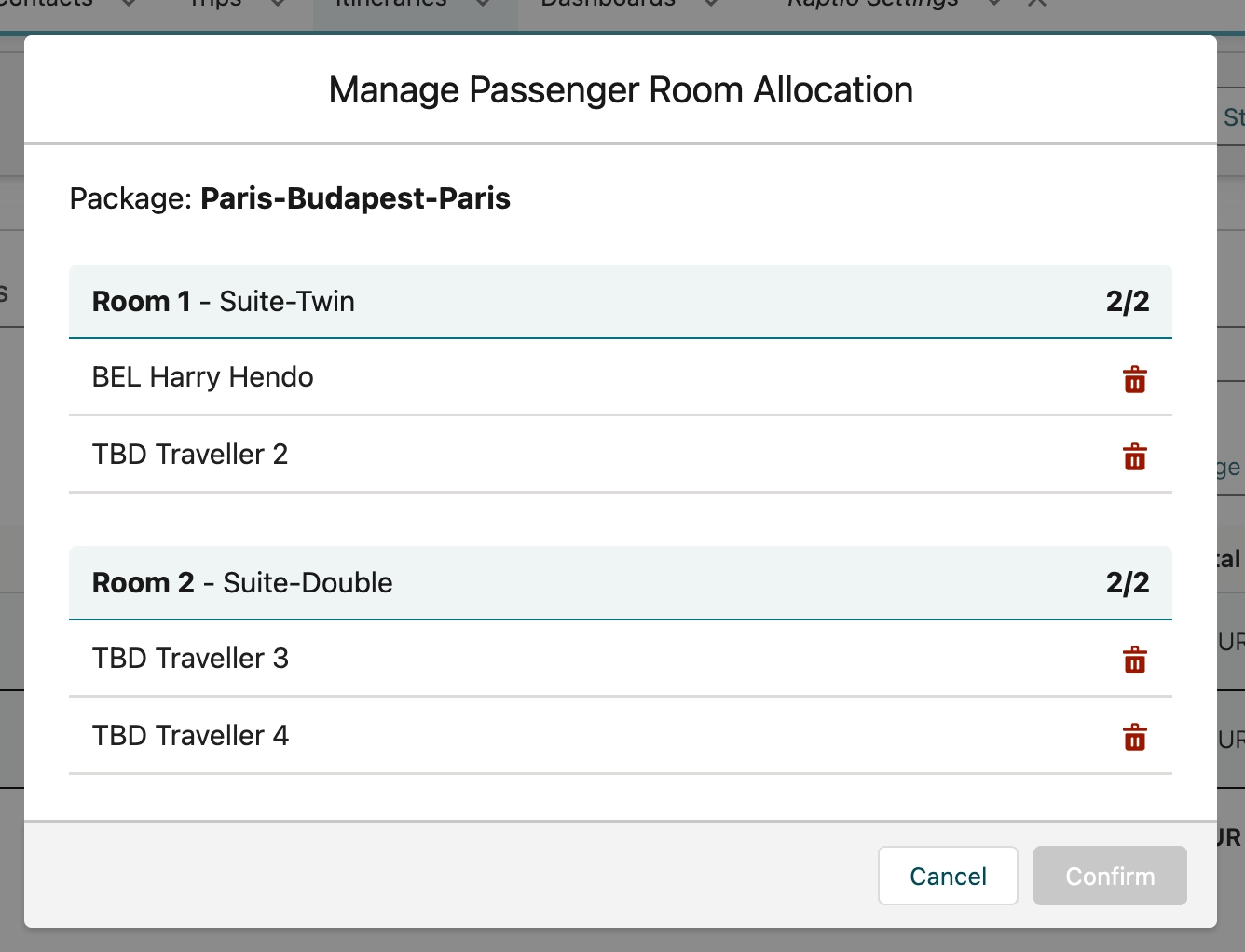
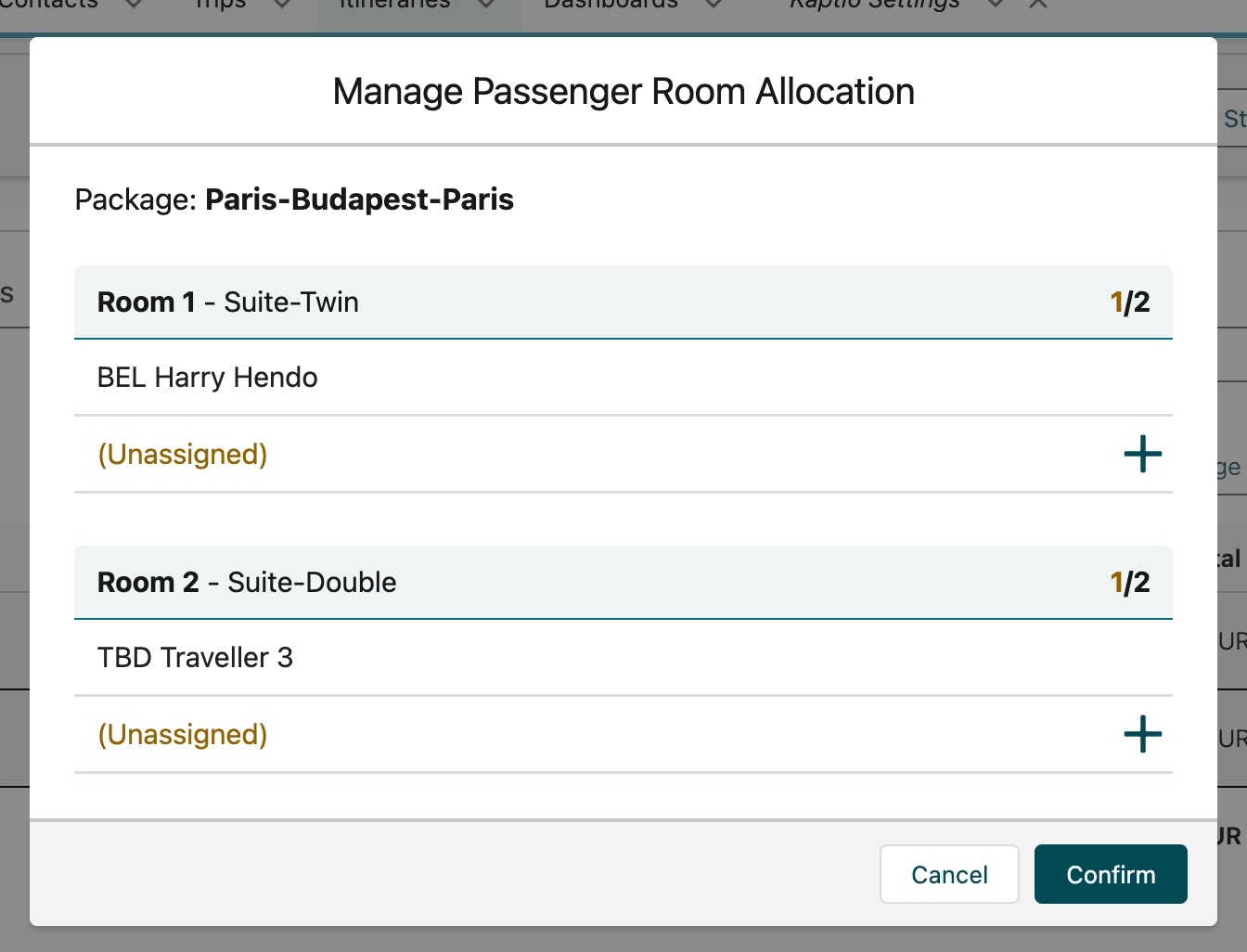
The only action available to the users is to remove passengers from the itinerary, however they cannot remove all passengers. The minimum number of passengers is one.
Known Issues
Passengers that were previously unassigned cannot be assigned again, this will be fixed in the upcoming patch.
Feature: Transfer
State Before
The cancellation fee was always waived upon transfer. Standalone services were left as is upon cancellation or transfer.
State After
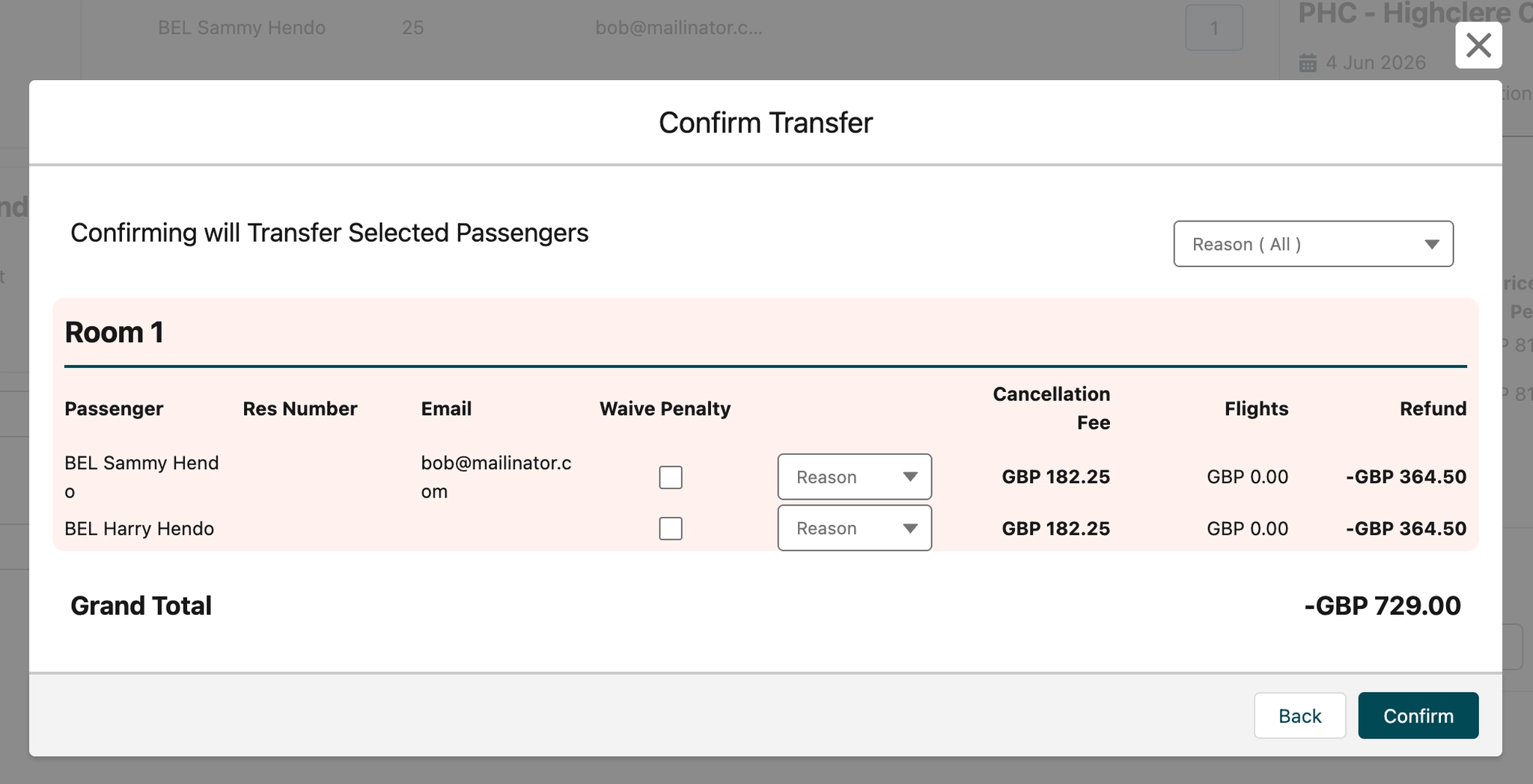
Upon transfer users are presented with a modal that enables you to either waive or apply cancellation fees.
Before cancel or transfer user must cancel all active standalone services.
How to enable?
-
Navigate to Custom Setting → User Overrides → Pilot Features
-
Add
EnableEnhancedTransferafter semicolon.
How it works?
When choosing a room to cancel
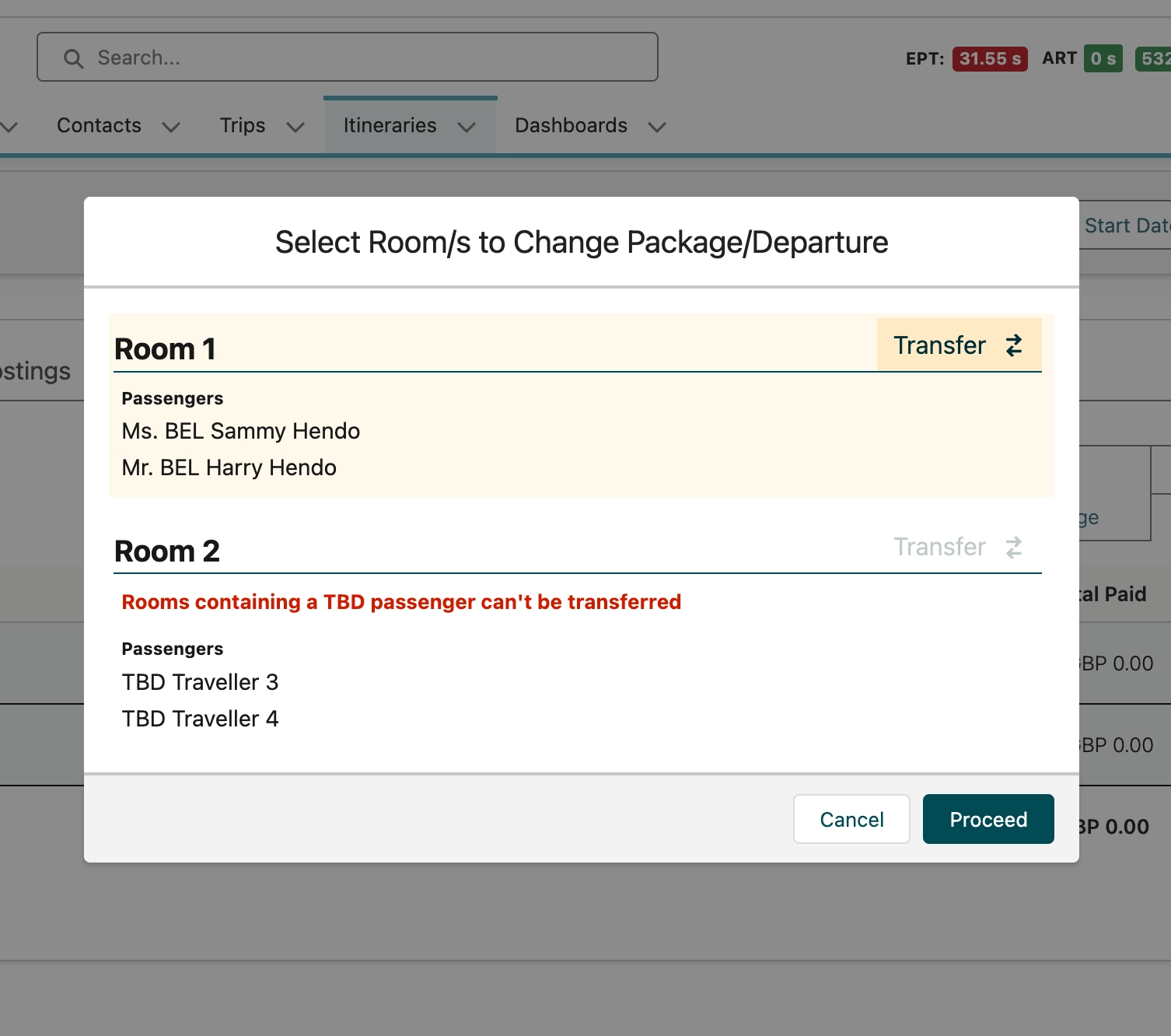
If there are standalone services assigned to the itinerary the next screen will ask user for a reason for cancellation.
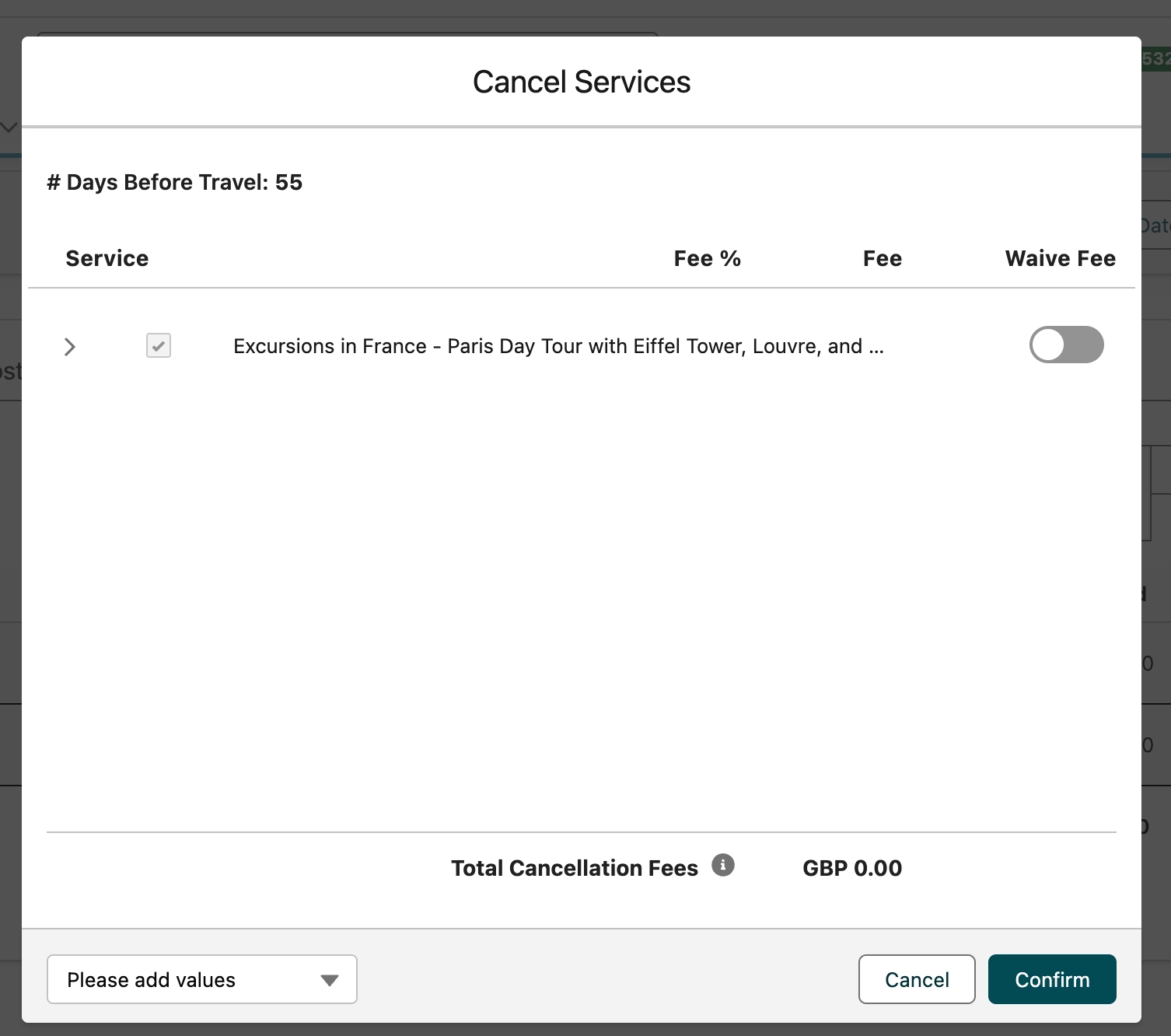
After choosing where to transfer user is asked to either waive or apply cancellation fees.
Feature: Pricing Controls
Pricing controls discounts in packages (ST-2695)
State Before
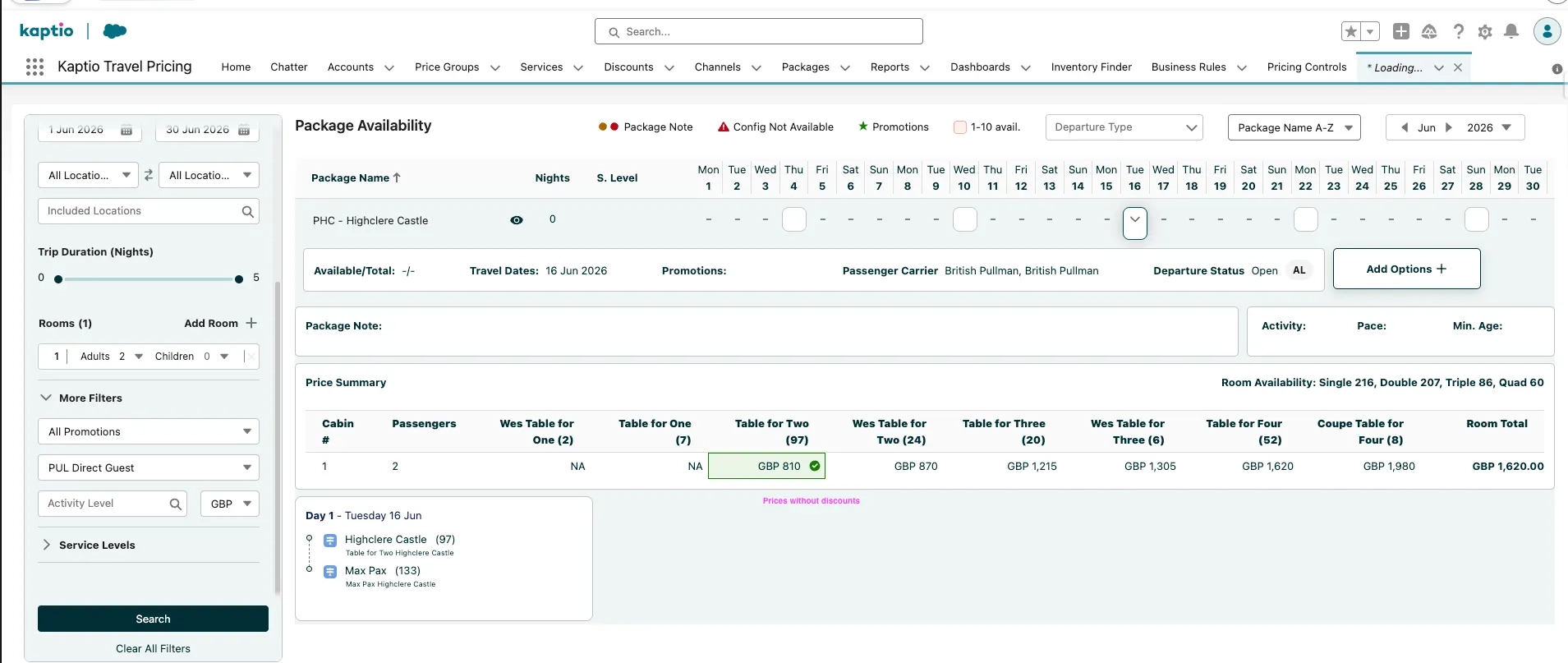
Discounts created in Pricing controls were not part of package pricing calculation in "Package search - Booking wizard" flow.
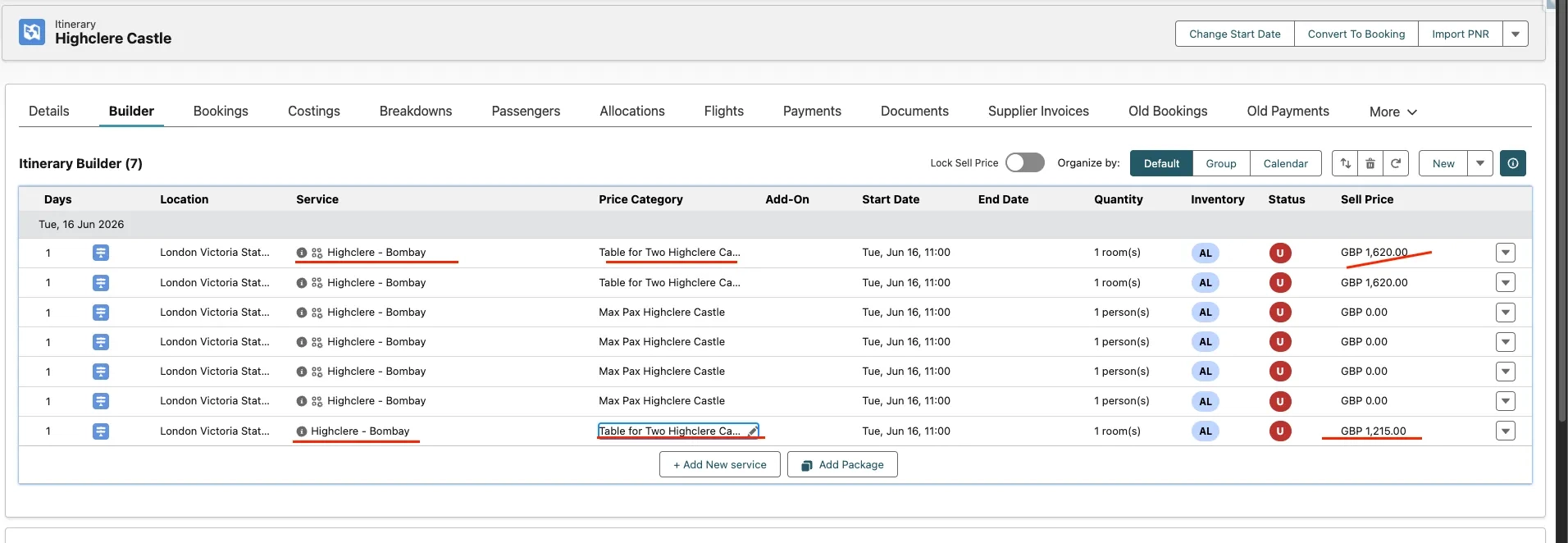
Discounts created in Pricing controls were not part of package pricing calculation when it was directly added to the itinerary
State After
The discounted values that come from discounts created in Pricing Control (i.e. discounts linked to 1 or more channel and service record and/or accounts via Price Groups) are now displayed for the corresponding services in Package Search, Booking Wizard and Booking Overview.
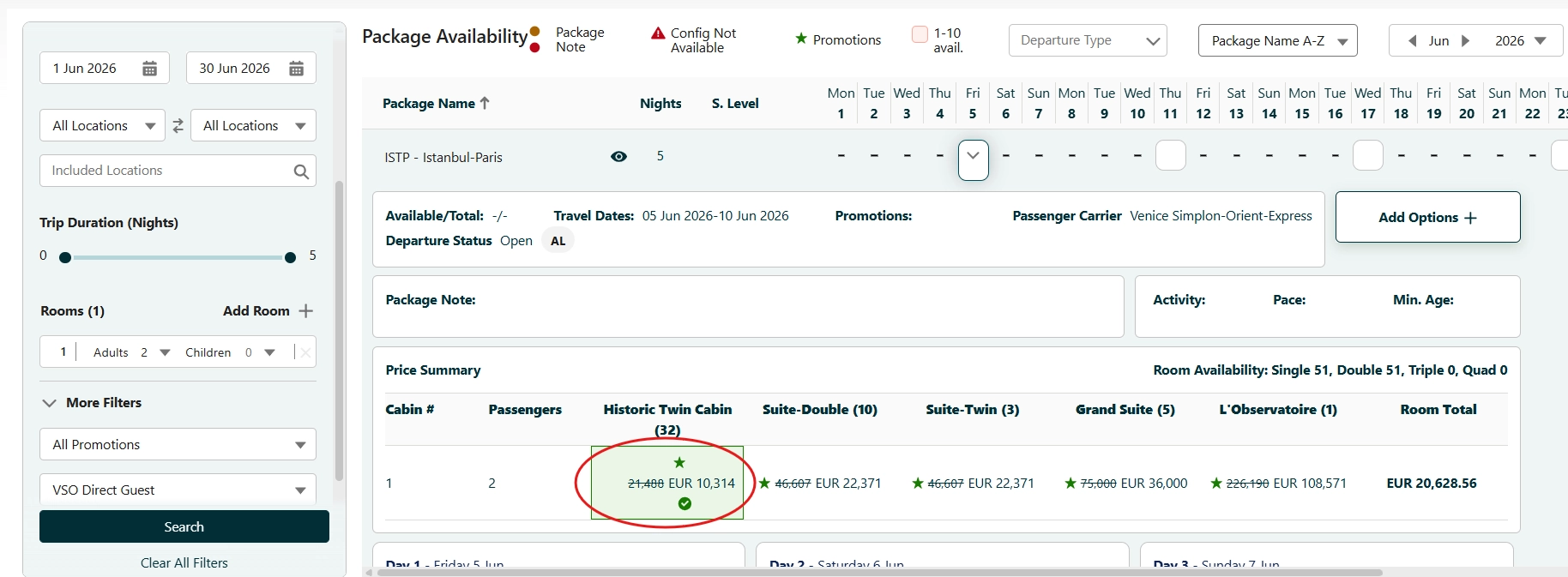
This is represented by the undiscounted prices now shown as struck through with the discounted prices just next to them without any formatting style, giving the user a clear visual sign of the prices for each service with and without the discount.
How to enable?
Set custom setting Pricing controls enabled to true.
How it works?
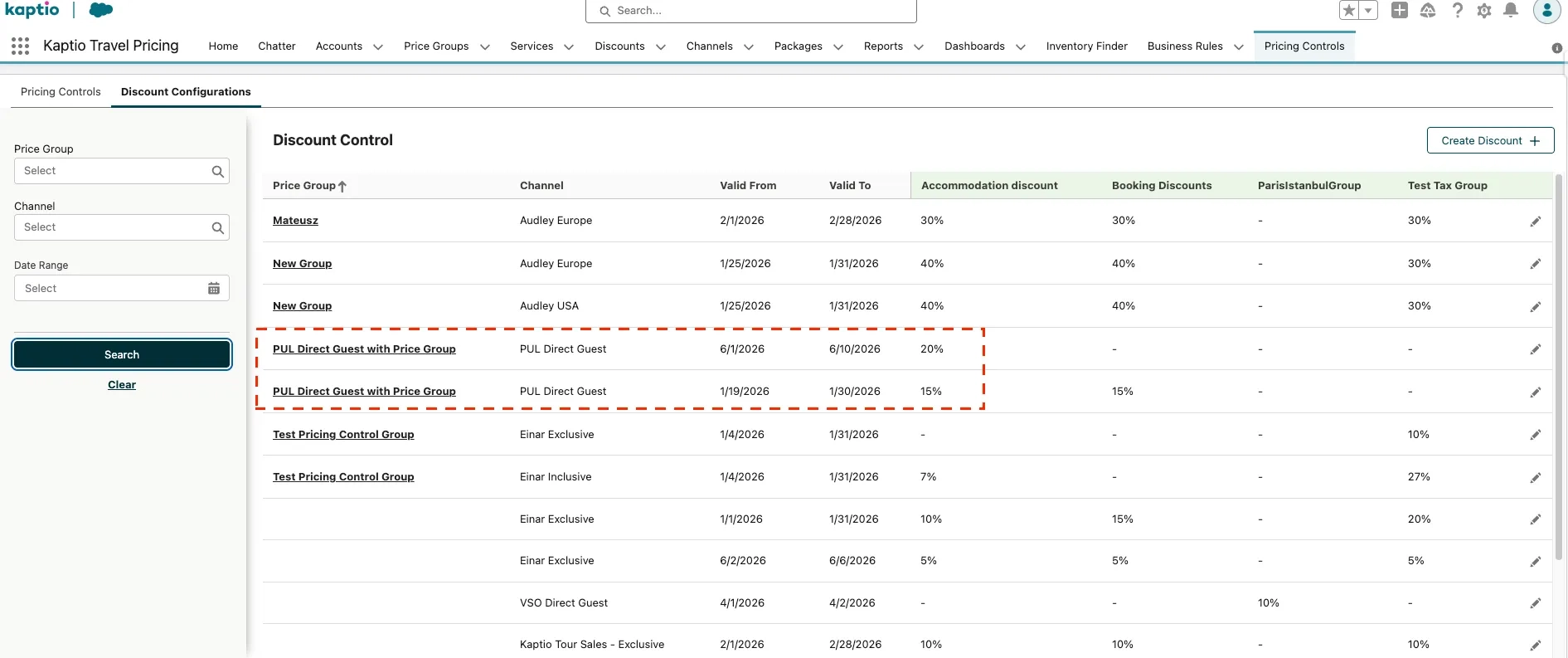
First the user must create a discount in Pricing Control → tab Discount Configuration → button Create Discount, with the following required configuration:
-
Date period
-
Channel
-
Some values for the linked discount group(s). Service records populated with a discount group will be affected by the discount value put here.
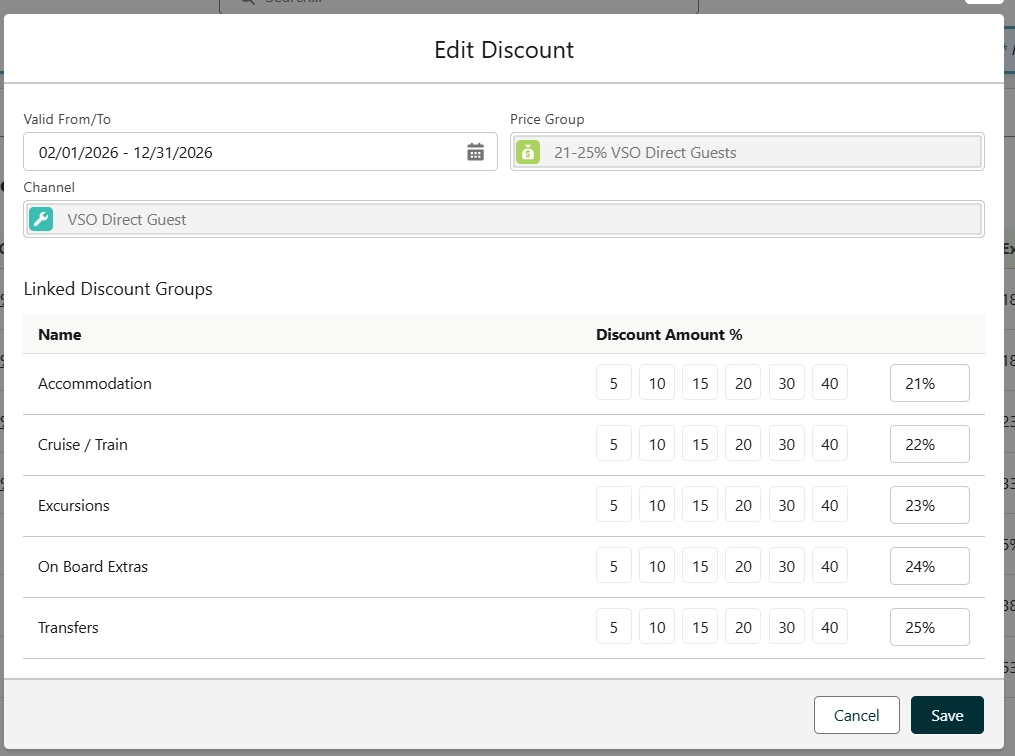
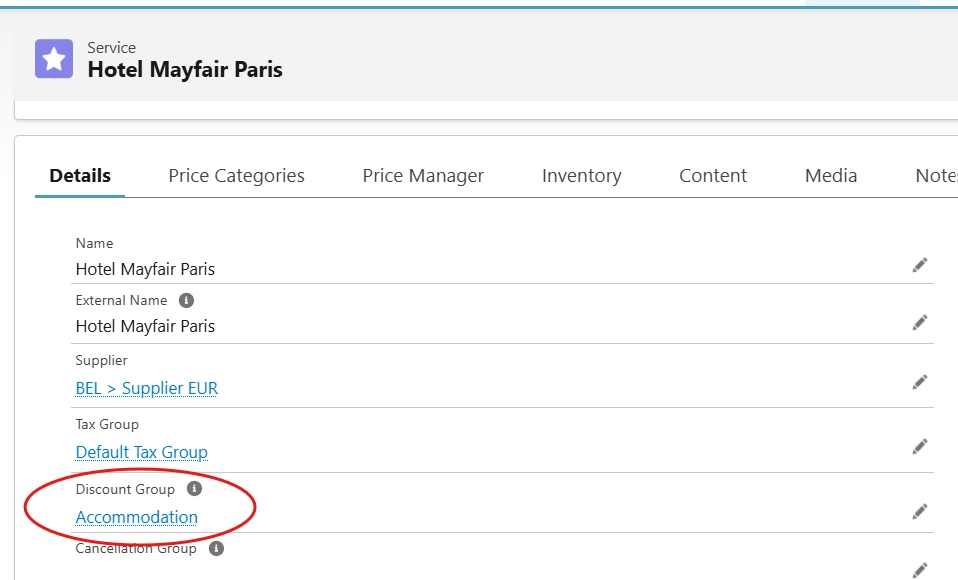
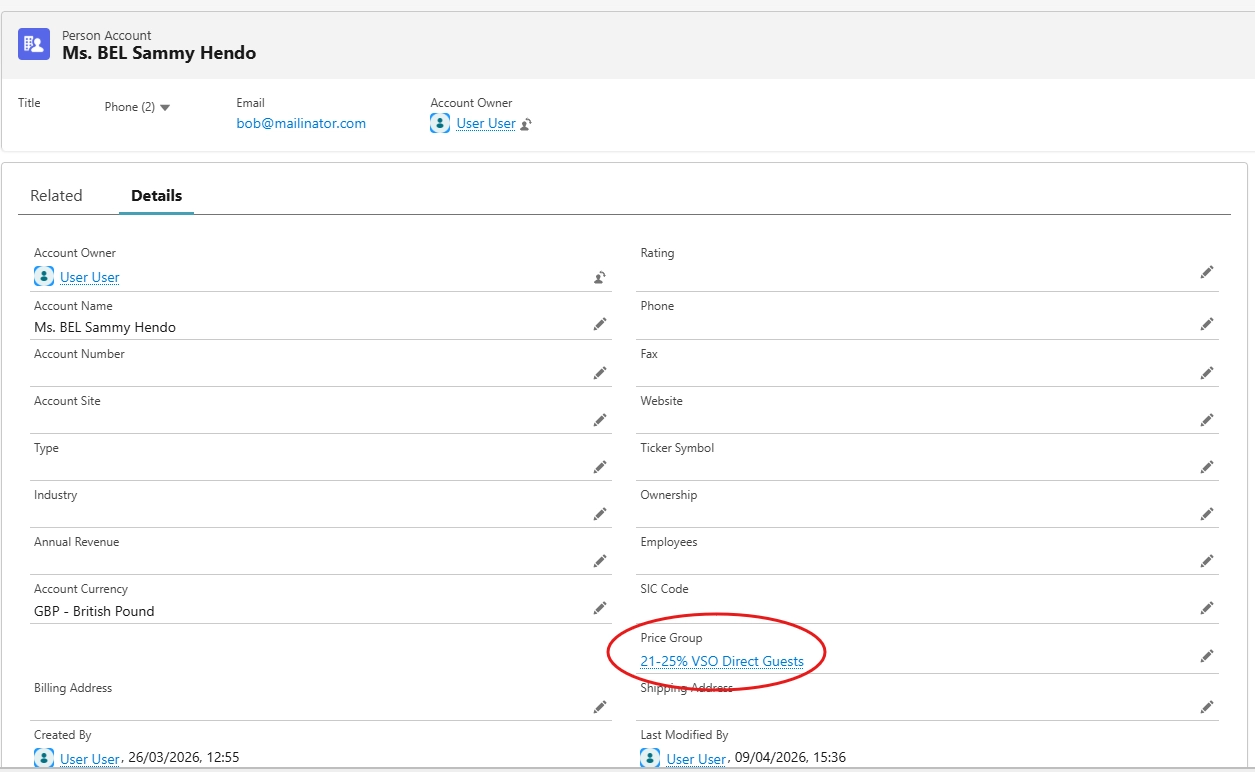
Selecting Price Group is optional but if that is done then the pricing controls discount will be linked to the same account(s) as those with the same price group.
In Package Search, after filtering the search by the time period, the channel and package(s) with services that correspond to the discount created in Pricing Controls, the discount for the cruise service will display in the expanded departure date for the package. The undiscounted prices display as struck through with the discounted prices just next to them without any formatting style.
|
If there are 2 pricing controls discounts with overlapping date periods, the same channel and the same or overlapping linked discount groups but Discount 1 has Price Group while Discount 2 does not have Price Group, then Discount 1 will be applied to the package if Package Search was accessed from an account with the Price Group. Else, if Package Search was accessed from an account that does not have the Price Group, then Discount 2 will be applied to the package. This is caused by the field ExclusivePriority__c in the Discount__c object, which by default gets the value = 100 when pricing controls discounts are created with Price Group and value = 200 when pricing controls discounts are created without Price Group. The lower the number the higher the priority. Discounts created manually from the discount tab (i.e. not from Pricing Controls) get ExclusivePriority = null by default. |
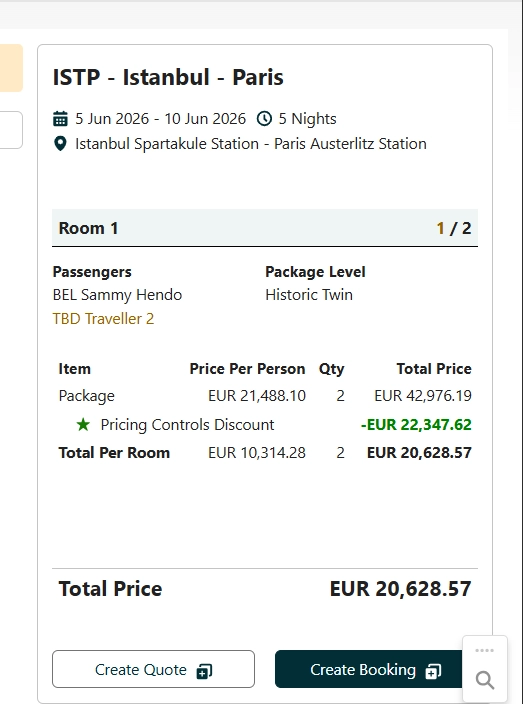
In Booking Wizard, the total discount for the whole package now displays as a negative amount in the price summary, labeled with a green star and the text 'Pricing Controls Discount'.
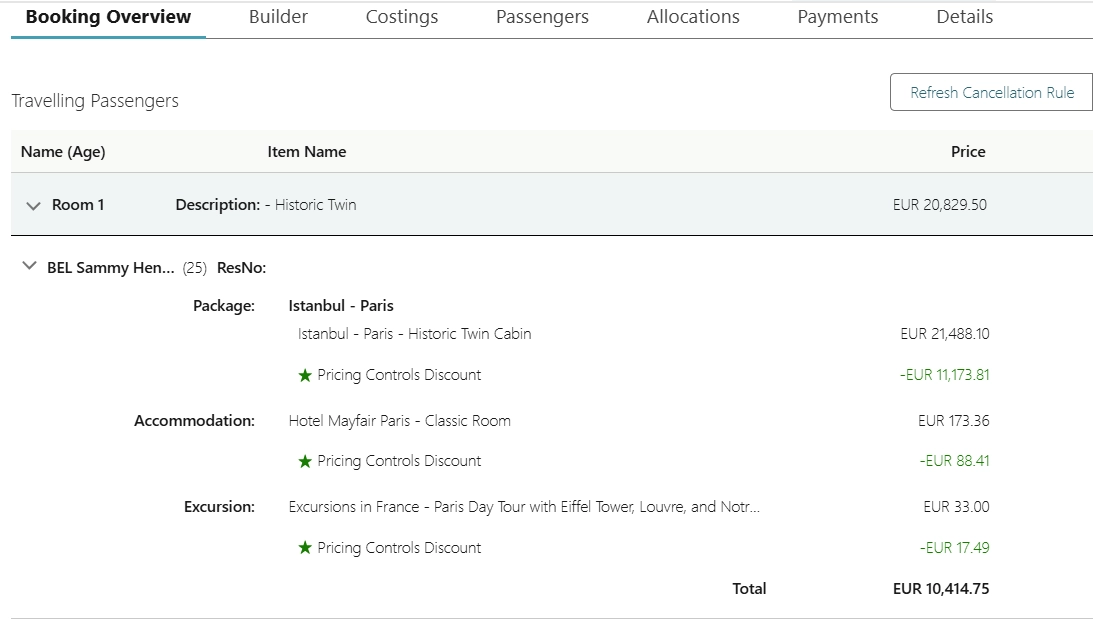
After creating the itinerary the discount displays also in Booking Overview in the same way as above, i.e. as a negative amount labeled with a green star and the text 'Pricing Controls Discount', but now broken down for each service record.
Known Issues
-
Itineraries with standalone services that have multiple discounts applied to it, of which one discount was manually created through discounts tab (Discount__c object) and other discount was created in Pricing Controls, return incorrect calculations for the discounts. This is a known issue in ticket https://kaptio.atlassian.net/browse/ST-2621
-
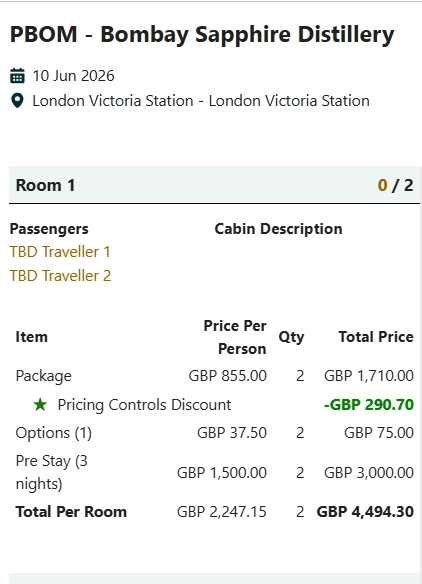
Pricing Controls Discounts that are linked to Optional or Pre/Post Stay services via discount group, and selected in the tabs Options, Pre Stay and Post Stay in Booking Wizard, are currently not displayed in the price summary section in Booking Wizard and their amount not included in the calculation of the room price.
Feature: Costings
Commission update but price does not (ST-2977)
New global API ResellerCommissionRecalculationApi.recalculateForItinerary: recalculates reseller commission for an itinerary using its current Account and Channel, without changing sell prices. Intended for flows where you update account/channel in your org, then invoke this API (see product documentation for sequencing and trigger handling).
Feature: Documents
Date-banded Content updates not working as expected (ST-2978)
Added automatic content option handling to find best matching content when generating customer document.
Feature: Package Search
Add price name field to the price line object (ST-2764)
Stamp Price Name from Item Price record on Itinerary Price Line record
Cabin/Seating Feedback NEW - Seating numbers in the Pullman train (ST-3031)
New Skip Cabin Occupancy Check option on Package Search. When enabled, availability no longer blocks options solely because of Cabin Type min/max occupancy in Salesforce—useful when one cabin represents one seat and price category occupancy drives the sale.
Allow >5 occupants per room in Package Search (ST-3145)
You can configure the maximum number of adults and children per room on the Package Search component (App Builder). Defaults stay at 5; raise them only when your KTAPI package configuration allows the same limits.
Feature: Passenger Grid
Add configuration.expandedRow.additionalRow.fieldSet from Passenger grid JSON to the list of mapping fields in passenger import (KT-14293)
The passenger import now includes fields defined in configuration.expandedRow.additionalRow.fieldSet from the Passenger Grid JSON schema when building the list of available import mapping fields. Previously, only row-level and server-side PGI fields were recognized — any custom/preference fields configured in the additionalRow section (e.g., passport details, dietary preferences, mobility info, VIP status) were ignored during import. This enables organizations using expanded passenger grid configurations to import all their configured fields via the passenger import tool.
Bug Fixes
Standalone Package Search (CEE-863)
Fixed Standalone Package Search not respecting the custom Add Primary Contact flow and the Set Add Option Booking Wizard checkbox when no Account ID is provided.
Transfer for Passenger not associated with a Person Account ⇒ Contact (ST-1832)
Improved transfer logic to allow named travellers without a linked Person Account to be transferred
Quantity in Price Summary does not correctly reflect what is selected (ST-3005)
Added display the quantity of selected options units per room/passenger in Booking Wizard Summary component.
Pricing Controls is not respecting Price Seasons (ST-3030)
Pricing Controls now respects Price Seasons when assigning a price point
JSON for Quantity and Swap Passenger (Modify) is not compatible in Booking Wizard Configuration (ST-3037)
Fixed malformed Booking Wizard configuration error handling.
Itinerary item for the second leg is not created when the room occupancy changes after a passenger cancellation. (ST-3056)
Included allotment days changes for cancelled items to fix missing itinerary items issue.
Services canceled in Booking Overview not immediately displayed in builder (ST-3081)
Trigger event to refresh itinerary items data in Itinerary Builder after cancelling standalone services from Booking Overview.
Flag "Transferred" attached to survivors after CO and Modify package (ST-3149)
Summary
Booking Overview could show a "Transferred" indicator for passengers who were still on the current itinerary, for example after Change Occupancy (such as reducing occupancy and cancelling one guest) or after Modify package flows that adjust the cabin or room configuration. In those cases the passenger was not moved to another booking, but the screen could still look as if they had been transferred.
What you will see now
-
The "Transferred" line (including the link to the source booking) in Booking Overview appears only when the passenger’s assignment reflects a transfer from a different itinerary.
-
Passengers who remain on the same itinerary after Change Occupancy, roommate cancellation, or similar room changes will no longer see that misleading "Transferred" label in the travelling-passenger section.
What is unchanged
-
Real passenger transfers between itineraries continue to be shown in Booking Overview as before, so staff can still see when someone was transferred from another booking.
Field Cancelled__c remains false on KaptioTravel__Passenger__c after passenger deallocation via Room Allocation (ST-3168)
Passenger gets cancelled (Cancelled = true) after deallocation
Deallocated passenger still appears in Payments tab without "Cancelled" flag (ST-3173)
Fixed Pax display name after Pax deallocation
Allocation tab does not update after deallocating the second passenger from another room (ST-3179)
Fixed allocation tab data refresh after passenger deallocation