Hawaii - Minor (22.27)
Release Summary
Kaptio is proud to announce this minor release for Hawaii. This release is intended to address issues with previous releases.
See Minor Changes and Bug Fixes for more information.
Deployment Guide
See this page for the Hawaii Deployment guide.
Minor Changes
Feature: Booking Overview
Booking Overview component visibility (ST-2812)
This update introduces two new properties for the LWC Kaptio Booking Overview component, allowing admins to control which Itinerary Items are displayed.
-
hideUnpricedServices
-
When set to
true: Itinerary Items with no price or a price of 0 are hidden from the Booking Overview. -
When set to
falseor not set: Itinerary Items with no price or a price of 0 are displayed. (Default) -
honorItemHiddenFlag
-
When set to
true: Itinerary Items with Hidden__c set totrueare hidden; those with Hidden__c set tofalseare shown. -
When set to
falseor not set: All Itinerary Items are displayed, regardless of the Hidden__c value. (Default)
Feature: Itinerary Builder
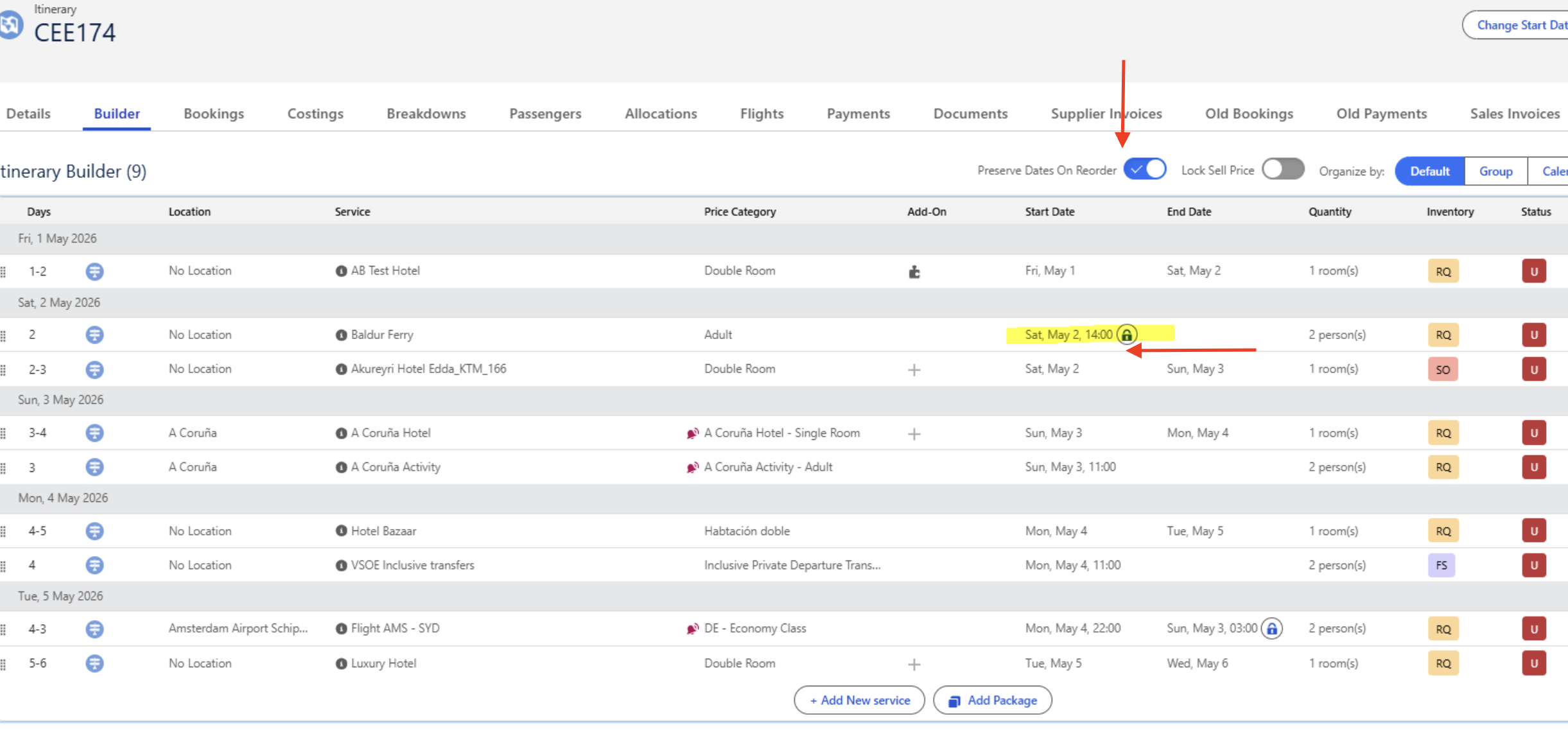
Manage the International Date Line correctly in Builder (CEE-174)
Introduced a new "Preserve Dates On Reorder" toggle in the Itinerary Builder (disabled by default). When enabled, users can lock dates for itinerary items, ensuring their dates remain unchanged when services are reordered or moved between sections.
Dates can be locked by clicking the small lock icon next to the Start Date or End Date on the itinerary item. When a date is locked, drag-and-drop actions will not modify the item’s date, while items without locked dates will continue to update automatically based on their position in the itinerary.
This feature supports multiple itinerary item types, including Flights, Accommodation, and Activities, and ensures correct dates and service order are reflected in generated proposal documents
Related Support Ticket: KHELP-11648, KHELP-10942, KHELP-10942, KHELP-11648
Feature: Right Rez
RightRez Automated Callback should validate on ItineraryStatus (ST-2888)
The PNR import and update process has been enhanced to validate the itinerary_status returned from the RightRez Connect API callback before any processing occurs. PNRs with a status of "Shell" or "Cancelled" will no longer be updated or imported into Kaptio, and a clear error message will be logged (e.g. "PNR {LOCATOR_CODE} did not update due to Shell/Cancelled status"). For PNRs in "Completed" status, updates will proceed as expected; however, if the update fails, the system will now log a specific error ("PNR {LOCATOR_CODE} unable to update PNR in completed status"). Additional validation has also been introduced to ensure valid HTTP responses and the presence of flight segments before processing, improving data integrity and preventing incorrect updates.
RightRez intregration to BW 1 (Unify NonTransferableItemsFilter__c Across Cancellation and Transfer Flows) (ST-2893)
We’ve improved how non-transferable items (such as flights) are handled during cancellations and transfers. Previously, different parts of the system identified these items in inconsistent ways, which could lead to incorrect cancellations or refund calculations. This update introduces a single configurable rule (NonTransferableItemsFilter) that consistently identifies non-transferable items across the platform. As a result, these items will remain active when a passenger or package is cancelled, and their value will be excluded from refund calculations as a held amount. Cancellation previews and summaries will now clearly show this amount separately (e.g., flights/non-refundable items), ensuring more accurate refunds and clearer visibility for users.
Send To GDS - When two arrival airports exist on a package use preferred airport flag (ST-2920)
We have enhanced the logic used to determine the IATA airport code for a location. Previously, the system expected exactly one airport within a location hierarchy and would return no result if multiple airports were found. This caused issues for destinations that legitimately have several airports (for example, the Los Angeles area). The updated behavior now returns the first airport found when sorted alphabetically by name, ensuring a consistent and predictable result even when multiple airports exist within the hierarchy. If no airport with an IATA code is found, the system will return no value as before. This provides more reliable results while a more advanced solution (such as using a preferred airport flag) is considered for the future.
Bug Fixes
Component Option Edit Modal: PriceList Picklist (CEE-550)
When editing component options, the PriceList dropdown previously showed a "--None--" entry instead of the "Most Applicable" option. Because both use the same empty value, selecting either one produced identical results, making the extra option confusing. The "--None--" entry is now removed from PriceList dropdowns in both Price Categories and Add-ons tables, leaving only the meaningful "Most Applicable" choice.
Promotion Effects: Fixed error when selecting Service Type (CEE-698)
Resolved an issue where selecting "Price Category", "Add-on", or "Service" as the Service Type when adding a new Effect on a Promotion caused a Salesforce error to appear, preventing interaction with the Supplier field.
Packages with "Sold Out" inventory records are added to Itinerary with no items (CEE-715)
Fixed the issue when Create Option / Create Itinerary button was active even when the package is non-bookable. The logic should now behave according to the matrix below:
| Create Itinerary Always Active = true | Create Itinerary Always Active = false | |
|---|---|---|
Bookable Package |
Create Itinerary enabled |
Create Itinerary enabled |
Non-Bookable Package |
Create Itinerary enabled |
Create Itinerary disabled |
Passengers details editing after document generation causes Salesforce error (CEE-724)
Resolved an issue where editing passenger details after generating a document caused a Salesforce error
Fuzzy Kaptio Setting Enabled limits Package Search filter to Bundles only (CEE-725)
Resolved an issue where enabling Fuzzy Package Name Search caused Package Search launched from the Account page to return only Bundles. The fix ensures that active packages and bundles are both returned, consistent with the standalone package search behavior.
Search field missing when adding a bundle component to a package (CEE-727)
Add Bundle to Package - Bundle Search Improvement When adding a bundle to a package using Add: Bundle Component, the selection process has been improved. Users can now type a phrase to search within the bundle list, and the results will be automatically filtered to show only bundles containing the entered text, making it faster and easier to find the desired bundle.
Linked services in costings don’t stick to transfers (CEE-765)
Fixed an issue where pick-up/drop-off time, location, and instructions were unexpectedly removed from transfer itinerary items after updating related pick-up or drop-off services in costings.
The problem occurred because the system only loaded linked-item configuration for the updated service item, causing related items needed to populate transfer locations to be missing from the processing cache. This resulted in the system clearing the transfer’s pick-up/drop-off details.
The fix ensures that all relevant linked items are properly loaded and evaluated, so transfer pick-up and drop-off details remain correctly populated unless the services are intentionally unlinked.
Salesforce error when making payment from Payments tab (CEE-768)
Fixed an error that occurred when opening the payment page from the Payments tab after selecting Payment Method = Credit Card and clicking "Make Payment."
The issue caused Salesforce to display the error _this4_resolve is not a function.
Amount of rooms is limited to 4 when room is added from Standalone Package Search (CEE-769)
Standalone Package Search - Room Limit Increased The maximum number of rooms that can be added in the Standalone Package Search has been increased from 4 to 99, allowing users to search for packages with a significantly higher number of rooms.
Account Specific Promotions Does Not Appear (CEE-779)
We resolved an issue where account-specific promotions were not appearing in package search results when the search was launched from an account. The problem occurred because the account ID was not passed in the customer_id parameter in the promotions/search API request. As a result, the API filtered out promotions tied to that specific account.
With this fix, the account ID is now correctly included in the request, allowing the API to return relevant account-specific promotions. These promotions will now appear in the package search results and can be successfully added to the itinerary.
Bookings coming through with GST - Not Related to the promo test (CEE-780)
Itinerary Creation - Tax Profile Inheritance Fix When creating an itinerary from a package search launched from an Account, Trip, or Standalone page, the itinerary will now correctly inherit the Tax Profile and Commission Tax Profile from the selected Account, instead of assigning the default tax profile
Unable to process payment in Docs or in Kaptio (CEE-790)
Payment Processing - Legacy Card Payment Page Error Fix Fixed an issue in the Payments tab where making a payment by card through the legacy payment page could fail after accepting the terms and continuing, showing the error: "t_resolve is not a function".
Package Search_summary prices section with EUR currency is not visible for the Land package (ST-2080)
-
Fixed internal bug where pricing was coming back as string from toFixed(); lightning-formatted-number expects number.
-
Added in greater fallback connection for currency selection
-
Added spinner while component/data loads for improved UI feedback.
Incorrect label in Operational Bulk Manager and filtering is not working (KT-14140)
Fixed an issue where Operational Itineraries were filtered by Confirmation Action instead of Confirmation Status.
Adding rooms increases price for the existing room (ST-2655)
Room payload no longer includes cabinId when physical inventory selection is not mandatory at the package level and the room was not modified. That stops the backend from treating unmodified rooms as newly added and applying pricing twice, which was causing duplicated pricing.
Inventory type icon for RQ disappears after pax cancellation (ST-2840)
We have enhanced the status logic for Pre-Stay and Post-Stay items in the Booking Overview to ensure consistent and accurate behaviour, particularly for cancelled and transferred passengers where inconsistencies previously occurred. Status codes now apply only to Pre/Post Stay items, preventing unintended status assignment elsewhere. Allotment inventory items reliably display AL (Allotment), while On Request items now evaluate against the full confirmed status family—including cancellation and amendment variants—to correctly determine whether they display C (Confirmed) or RQ (On Request). Items with a blank inventory status also default to On Request, aligning behaviour with the Itinerary Builder and ensuring consistent status presentation across all passenger scenarios.
Improved error messages on manual import of cancelled or shell PNRs from RightRez (ST-2842)
When attempting to import a PNR that is in a Cancelled or Shell state, the system will now display a clearer error message indicating that the PNR cannot be imported. Previously, users might see a more technical message about a missing fare breakdown. This update improves clarity by explaining the actual reason the import cannot proceed.
Unallocated onboard extra option still available for editing in Modify (ST-2870)
Fixed display refreshed allocation table data after saving changes in itinerary made by Booking Wizard edit modes when in console navigation view.
Increasing quantity of a single optional service of UOM = Unit(s) does not activate isCrossRoomAllocation flag (ST-2872)
Fix displayed quantity in Booking Wizard edit modes for cross room allocated Unit based options.
Fix Passenger Names For PNR Import (ST-2873)
Updated the name matching logic to cover middle names in either first or last name, and support spaces and other special characters in Salesforce. Note: acute/accented characters are exclude as GDS do not support them.
Fields sync from Contact to Passenger (ST-2898)
The following fields are now included in the allowed field mapping from Contact to Passenger:
-
Passport First Name
-
Passport Last Name
-
Passport Middle Name
-
Passport Number
-
Expiration Date
-
Meal Request
-
Departure Airport
-
Traveller Number
Action required: Any Contact-to-Passenger flows must be updated to map these fields in the Transform element for them to be populated.
Error when clicking eye icon during transfer to Cruise package (ST-2909)
Addressed an issue where passenger selections were being passed incorrectly to the POST /cabins endpoint.
Improved exception type for PNR duplication validation (ST-2914)
Fixed the exception type for active PNR duplicate validation so that it could be raised outside the Visualforce and Aura context.
Mismatch between itinerary and Itinerary Package Departure (ST-2923)
Additional guards have been implemented to mitigate the risk of creating itinerary without Itinerary Package Departure
Expired voucher amount is added to refund amount for cancelled guest (ST-2937)
Fixed an issue where voucher-backed payments were incorrectly included in the cash refund calculation when cancelling a booking. Previously, if a passenger paid partially with a voucher and the voucher was expired, the system refunded the full amount paid (including the voucher portion). With this fix, voucher payments—expired or not—are excluded from the cash refund calculation, ensuring that only the actual cash paid is refunded. For example, if a passenger paid 1,649 in total including a 250 voucher, the correct refund after cancellation will now be 1,399 instead of 1,649. This correction is reflected consistently across Booking Wizard and Booking Overview screens.
Promotions Rules Tab Crash on Orgs with Sales Engagement (ST-2941)
Fixed an error on the Promotions object Rules tab occurring in orgs where both Person Accounts and Sales Engagement are enabled.
Prices on PNR Ticket Pricing not updated on manual refresh when tax features active (ST-2942)
Manually triggered PNR refresh now updates all prices from RightRez
Automatically triggered refresh do not update any price (ST-2943)
Both manually and automatically triggered refresh now update prices from RightRez correctly.
When PRE or POST stay is opted by guests in two rooms temporary hold is considering only for one room (ST-2944)
Fixed temporary hold cross-room state key collision for pre/post stay, which caused only one allotment to be held
Assignment Reservation Number on Room Assignment not populated for migrated reservations (ST-2945)
Fixed a bug where the reservation number would not get populated on room assignments when passed to BookingAPI in passengers DTO
Incorrect Total price displayed in Booking wizard cancellation flow (ST-2946)
Enhancements have been made to the Booking Wizard to improve pricing accuracy and stability when modifying room configurations. Accommodation components are now only included in package totals when appropriate, preventing certain items from being counted twice when they are already priced through selection tabs such as pre/post stays or options. Additionally, improvements to room handling ensure that passenger selections are preserved when rooms are removed during cancellation or package changes, allowing related items such as protection plans and optional services to be priced correctly. These updates help ensure more consistent totals and a smoother experience when editing bookings.
Failed Asynchronous Job records not created when triggering auto import (ST-2973)
We have enhanced the PNRServiceAsyncV2 asynchronous service to improve flexibility and reliability. The onSuccess and onFailure methods are now defined as virtual, allowing customers or future implementations to override and extend the default behavior when handling job completion or failures. Additionally, the failure handling logic has been adjusted so that asynchronous jobs behave correctly outside of test execution, ensuring failures are properly surfaced in production environments while still allowing test execution to run without interruption. Comprehensive unit tests have also been added to validate the service behavior and support ongoing maintainability.
Lock Price doesn’t work when CopyCostTaxToSellTax and CommissionedTaxCodes are active (ST-3011)
Lock Price is now respected when CopyCostTaxToSellTax and CommissionedTaxCodes features are active.
Wrong non transferrable values for Flight after transfer (ST-3015)
A fix has been implemented to correct the refund calculation for non-transferable items (such as Flights and PNR Flights) when passengers are transferred or cancelled. Previously, when these item types were included in the NonTransferableItemsFilter__c setting, the value of the flight could be counted twice in the refund calculation--once as part of the cancellation fee and again as a flight deduction—resulting in incorrect refund amounts in the Booking Overview. The update ensures that non-transferable item fees are included in the displayed cancellation fee but excluded from the refund calculation, preventing double counting and producing accurate refund values after passenger transfers or cancellations.