Hawaii - Minor (22.12)
Release Summary
Kaptio is proud to announce this Minor Release for Hawaii. This release is intended to address issues with previous releases.
See Minor Changes and Bug Fixes for more information.
Minor Changes
Feature: Cabin Allocation tool
Create a cabin allocation tool filter & carriage list component (GTT-485)
Implemented the "create a cabin allocation tool filter & carriage list" and the "cabin set layout editor" components
Create passenger allocation component (GTT-486)
Implemented the "create passenger allocation" component
Add button "Select scheme image" to the Cabin Set Layout Editor (GTT-572)
Added button to upload images to the Cabin Set Layout Editor
Delete lookup from Service cabin object to the Cabin Set object (GTT-594)
The CabinSet__c field has been deleted from the source
-
Post-Upgrade Step: After upgrading to this version, subscribers must manually delete the CabinSet__c on the ServiceCabin__c object field from their orgs
Add tabs and related lists for Cabin allocation data setup (GTT-620)
PDS: add Route field to the field set for Price Category object
Feature: Group Tour
Changes in FOC rules for Price Models (GTT-575)
Added IsCumulative field on DiscountPassengerRule object and logic to handle counting prices on pricing overview for exact group size, changed DiscountPassengerRule to BusinessRule conversion logic. Added new checkbox on DiscountPax modal on Pricing Overview UI.
Feature: Itinerary Builder
Show Itinerary items with 'Pending Operations' status on the Builder tab (GTT-627)
A "Show Operations Pending" toggle has been added to the Builder tab for "Operational" itineraries. This toggle controls the visibility of "Operations Pending" lines in the builder.
Split/merge lines based on the response from /itineraries/update_operational_itinerary endpoint (GTT-588)
Added splitting Itinerary Item into two if not all its units have the same inventory status.
Callout to re-evaluation endpoint when new serice is insterted to the Operational itinerary (GTT-603)
Fixed missing Operational Itinerary revaluation when inserting Itinerary Items
Change the Operational re-evaluation response processing (support more than 1500 pax assingments) (GTT-606)
Added support of more than 1500 pax assignments during Itinerary revaluation
Feature: Inventory Management
Tour departure assignment/re-assignment to the Allotment days from Inventory LWC (non Tour departure grouping) (GTT-539)
Added tour departure assignment/re-assignment to the Allotment days from Inventory LWC
Create a Feature Flag for Skip inventory checks for On-Request service (CEE-540)
What’s Changed
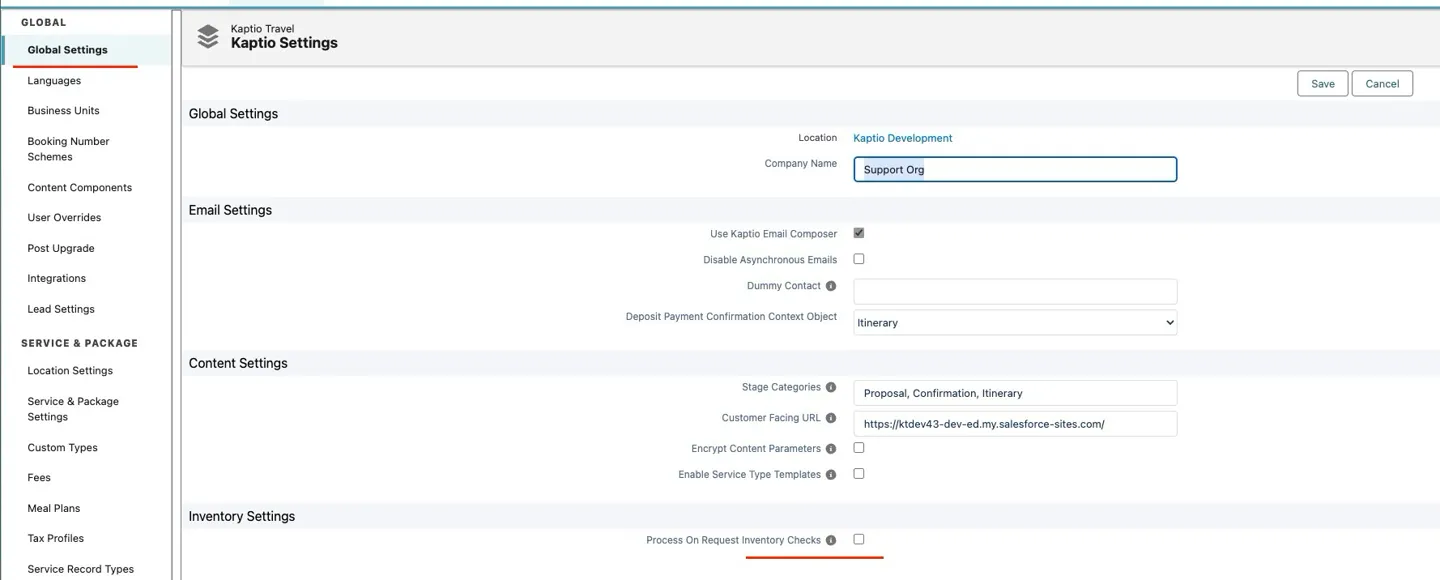
New Setting: "Process On Request Inventory Checks"
The inventory settings now include a checkbox labelled "Process On Request Inventory Checks" in the App Settings page.
How It Works
-
☐ Unchecked (Default): On Request services skip inventory availability checks
-
Services are always bookable without querying actual inventory levels
-
The default inventory status is automatically assigned
-
This is the recommended default for most organisations
-
☑ Checked: On Request services process inventory checks
-
Actual inventory availability is queried
-
Availability depends on real inventory levels
-
Use this if you want to track and enforce inventory limits for On Request services
Technical Details
For Administrators
Location: Setup → App Settings → Inventory Settings section
Field Details:
-
API Name:
ProcessOnRequestInventoryChecks__c -
Type: Checkbox
-
Default Value: Unchecked (false)
Help Text:
Getting Started
Initial Setup
No action required. The setting defaults to unchecked (skip inventory checks for On Request services).
Customizing the Behavior
To change how On Request services handle inventory checks:
-
Go to Setup → App Settings
-
Scroll to "Inventory Settings" section
-
Check or uncheck "Process On Request Inventory Checks" based on your needs:
-
Unchecked: On Request services are always bookable (recommended)
-
Checked: On Request services check actual inventory availability
-
Added a feature flag to control whether package logic skips inventory checks for On-Request services. This allows organizations to choose between performance optimization and full inventory tracking based on their operational needs.
Related Support Ticket: KHELP-12358
Feature: Passenger Grid
Pre-populate channel role if it is blank in passenger import (KT-13859)
Enhancement: Automatic Channel Role Assignment in Passenger Import
Issue: During passenger import operations, the Channel Role field was not being automatically populated when left blank, requiring manual assignment after import. This was particularly problematic for bulk imports where passenger age information was available but not being used to determine appropriate channel roles (Adult, Child, etc.).
Solution: Enhanced the passenger import logic to automatically assign appropriate channel roles based on passenger age:
-
When no channel role is specified in the import data, the system now checks the passenger’s age against configured channel role age ranges
-
If a matching age-appropriate channel role is found, it is automatically assigned
-
Falls back to the Adult channel role as default when age doesn’t match any configured ranges
-
Implemented shared import service (
PassengerImportService.importPassengersFromRows) to consolidate import logic across REST API and CSV/Excel import flows -
Updated bulk operations to leverage the new shared import service for consistency
Impact:
-
Passengers are now automatically assigned correct channel roles during import based on their age
-
Reduces manual data entry and post-import corrections
-
Ensures consistent channel role assignment across all import methods (REST API, CSV, Excel, bulk operations)
-
Improves data accuracy for pricing and configuration assignments that depend on channel roles
Change the cursor icon when user hover over the buttons in Passenger import component (KT-13860)
The cursor icon now changes to "hand" when hovering over actions in the top right corner of the itinerary’s "Passengers" tab.
Bug Fixes
Fare Class Field Becomes Disabled and Uneditable in Manual Rail Segment Modal (CEE-463)
Fixed the field state management logic in the Manual Rail segment modal to keep the Fare Class field editable even after being cleared or when focus leaves the field. The field now remains enabled and allows users to enter or modify the Fare Class value at any time before saving.
Package Search Modal Content Cut Off When Accessed from Trip/Itinerary (CEE-492)
From now on we can see the entire Package and the scroll bar along the bottom
"Attempt to de-reference a null object" Error When Bulk Moving Live Rails with Occupancy Pricing (CEE-493)
Fixed the price request building logic to ensure response.price_lines_by_passengers is always included in response_fields when occupancy pricing is enabled on the service, regardless of other conditions.
Related Support Ticket: KHELP-12322
Incorrect Price Requests for Live Rails After Bulk Date Moves (CEE-495)
Fixed the price request building logic to correctly associate search_parameters with their corresponding selected_trips for each rail itinerary.
Related Support Ticket: KHELP-12324, KHELP-12261
Fare Class and Service Level Not Persisting for Live Rail Component Options in Packages(CEE-498)
Fixed the "Cannot Set Properties of Undefined (setting 'IsDisabled')" Error when opening existing Live Rail components.
Related Support Ticket: KHELP-12320
Fare Class and Service Level Not Persisting for Live Rail Component Options in Packages (CEE-538)
Fixed the save logic to properly persist Fare Class and Service Level values for Live Rail component options.
Related Support Ticket: KHELP-12370
Reservation Cancellation Failures Due to Missing Sales Price Line for Custom Items (CEE-544)
Fixed the cancellation price calculation logic to include the actual sales price for custom items in the price request. The system now properly sends both supplier and sales price lines when requesting prices for custom items during cancellation, ensuring the API receives all required data to calculate cancellation totals.
Related Support Ticket: KHELP-12373
Incorrect Confirmation Status When Cancelling Itineraries (CEE-545)
When cancelling an itinerary, all services (including previously confirmed services and those with "Confirmation Not Needed" status) were incorrectly being set to "Cancelled Manually" (61) instead of the appropriate status based on their pre-cancellation confirmation state.
Related Support Ticket: KHELP-12374
"Re-check Inventory" Not Working for On-Request Services with Advanced Inventory Setup (CEE-567)
Fixed the inventory check logic to ensure that services with Advanced inventory setup are always checked for inventory changes, regardless of their current status.
Related Support Ticket: KHELP-12358
Calculations for generating Price Model Output records are not considering promotions IF a custom field has been introduced (GTT-499)
Updated price calculation KTAPI request with itinerary fields from custom metadata type to consider promotion rules
Validations on By Departure Inventory creation tab disappear when switching tabs between service and Inventory (GTT-519)
Reapply validation rules when switching btw tabs
Creation of Tour Departure without Departure Status (GTT-590)
Fixed bug with saving empty required field Departure status.
Truncate a Callout snapshot record if it’s too big (GTT-613)
Truncated JSONRequest field value if length achieved max field length limit ---
Can’t set IsCrewMemeber flag for channel role in existing Kaptio settings interface (GTT-616)
Added IsCrewMemeber flag for channel role modals
Inventory contracts are created with incorrect Allotment Categories in new Inventory LWC (GTT-617)
Fixed bug that Inventory contracts are created with incorrect Allotment Categories in new Inventory LWC
Cancel button in Edit Supplier Agreement popup does not work as expected NX-1102 (KT-13380)
Issue: The Cancel button in the Edit Supplier Agreement popup now properly discards changes and restores original values. Previously, modifications made to the form would remain visible even after clicking Cancel, causing confusion about which values were actually saved.
Impact When editing a Supplier Agreement, clicking Cancel will immediately revert all fields to their saved values. The form will consistently display the correct saved data when reopened, eliminating confusion caused by unsaved changes persisting in the interface.
Example: When the Agreement Type is changed from "Commission" to "Net Rate" and Cancel is clicked, the form now correctly reverts to displaying "Commission" rather than incorrectly showing "Net Rate" on subsequent edits.
Duplicate Supplier Agreements Created on Repeated Save (KT-13852)
Issue: When creating or editing a supplier agreement, clicking the Save button multiple times could result in duplicate agreements being created in the system.
Root Cause: The Save button did not have proper protection against multiple rapid clicks. Once a save operation was initiated, the button remained enabled, allowing users to submit multiple requests before the first one completed.
Resolution: We’ve improved the save button’s handling to prevent duplicate submissions. The button is now properly disabled during the save operation, and users will see a loading indicator while their agreement is being saved. Once the save completes (successfully or with an error), the button is re-enabled for further action.
Impact:
-
✅ Users can no longer accidentally create duplicate supplier agreements by clicking Save multiple times
-
✅ Clear visual feedback (loading indicator) during save operations
-
✅ Improved user experience with better button state management
Action Required: No action needed. This fix is automatic and applies to all existing and new supplier agreements.
Duplicate "When" Field Value in Supplier Payment Rules Table (KT-13854)
Issue: The Description field in the Supplier Payment Rules table now displays correctly without duplication. Previously, the "When" field value (e.g., "Before Travel", "After Booking") appeared twice in the description, creating redundant and confusing text.
What Changed: The payment rule description format has been corrected to display:
-
Before:
Deposit 30 days Before Travel Before Travel(duplicated "Before Travel") -
After:
Deposit 30 days Before Travel(clean, non-duplicated format)
Additionally, the description now properly uses singular "day" when the Days field equals 1, and plural "days" for all other values, improving readability.
Impact: Payment rules in the Supplier Agreement will now display clear, properly formatted descriptions without duplicate values, making it easier to understand payment terms at a glance.
Incorrect Passenger Date of Birth in Passenger Import (KT-13857)
Issue: Date fields in the passenger import feature (including Date of Birth) now import correctly without timezone conversion errors. Previously, dates in imported CSV or Excel files could be shifted by one day due to automatic timezone adjustments during parsing.
Root Cause: When Excel files were parsed, the XLSX library was configured to convert date cells into JavaScript Date objects, which triggered browser timezone conversions. This caused dates to shift unexpectedly depending on the user’s timezone.
Example of previous behavior:
* Import file contains: DateOfBirth__c: 1990-06-30
* After import, passenger record shows: 1990-06-29 (shifted by one day)
What Changed: The file parser now processes dates as formatted strings rather than Date objects, preventing timezone conversion:
-
XLSX library configured with
cellDates: falseanddateNF: 'yyyy-mm-dd'to preserve date formatting -
Date values are processed with
raw: falseto maintain string format throughout import -
All date fields (Date of Birth, travel dates, etc.) now import exactly as they appear in the source file
Impact: Passenger imports will now display dates exactly as specified in the uploaded CSV or Excel file, eliminating one-day discrepancies caused by timezone conversion.
Passenger Import Failure When Date of Birth or Age Fields Are Empty (KT-13858)
Issue: Passenger import operations were failing when Date of Birth (DoB) or Age fields contained empty strings or null values. The system was attempting to parse empty strings as date values, resulting in "Invalid date:" exceptions that prevented the entire passenger record from being imported, even when other required fields were properly populated.
Solution: Enhanced the passenger import field validation logic to properly handle empty or blank values:
-
Added blank string check before attempting to parse field values, particularly for date and numeric fields
-
Empty strings and null values are now skipped during field mapping instead of causing parse errors
-
Updated both bulk operations (
ImportPassengersOperation) and REST API import flows (PassengerImportController) for consistent handling -
Added test coverage to verify passengers can be imported successfully with empty DoB and Age fields
Impact:
-
Passengers can now be imported successfully even when optional fields like Date of Birth or Age are left blank
-
Prevents import failures due to empty date/numeric field values
-
Improves data import reliability and user experience when importing passenger manifests with incomplete information
-
Users can import passengers with partial data and update missing fields later
Passenger Import Limited to 200 Records (KT-13904)
Issue: When importing passenger files with more than 200 records, only the first 200 passengers were imported with no error messages displayed.
Root Cause: The itinerary query included a Passengers__r subquery that hit Salesforce’s aggregate query row limit (200 rows) during bulk passenger inserts, silently failing the operation.
Solution:
* Refactored Passengers trigger to query passengers separately from itinerary data, avoiding the aggregate query limit
* Passengers are now queried independently and grouped by itinerary ID, allowing processing of unlimited passenger records
* Enhanced error notifications to display success/error counts and stack traces for better visibility
* Improved error handling in post-processing operations with granular exception categories
* Updated notification labels to show import result counts
Impact: * Passengers can now be bulk imported in unlimited quantities (previously capped at 200) * Import failures are now properly logged and reported to users * More robust handling of post-processing failures (room assignments, configuration assignments, TBD cleanup)
Compatibility: No breaking changes. Existing imports of ≤200 passengers remain unaffected.
Configuration Assignments Preserved When Room Group ID Changes (KT-13905)
Issue: When a passenger’s room group ID was changed in the Passengers Grid, their existing configuration assignments were being inadvertently deleted. This occurred because the system was not properly marking existing configurations as selected when loading passenger data, causing the UI to treat them as unselected and removing them during updates.
Solution: Updated PassengersGridController to set passengerConfiguration.selected = true when loading existing configuration assignments. This ensures that previously assigned configurations are correctly identified as selected in the UI, preventing them from being deleted when room assignments change.
Impact: Passenger configuration assignments now persist correctly when room group IDs are modified. Users can change room assignments without losing previously configured services for passengers.
Duplicates for Passenger Configuration Assignements when you update passenger data via import (KT-13912) Issue: Passenger Configuration Assignment records were being duplicated when passengers were re-imported or re-evaluated within the same itinerary. This occurred because the system was upserting assignments without properly handling existing records, causing multiple copies of the same configuration assignment to accumulate.
Solution:
-
Added
deleteExistingConfigurationAssignments()method to PassengerImportService that clears old configuration assignments before creating new ones -
Added
selectByPassengerIds()method to PassengerConfigAssignmentsSelector for efficient querying of existing assignments by passenger ID -
Updated configuration assignment creation to use KaptioUowV1 for proper DML handling
-
Added comprehensive test coverage to prevent regression
Impact: Passenger re-import and re-evaluation operations now correctly update configuration assignments without creating duplicates. This ensures accurate passenger configuration tracking and prevents data integrity issues.